How I make $10–30k a month
“clipping” with Viewcat.
Clipping means cutting long videos into short viral clips and getting paid for the views. Here's the whole setup a beginner needs, step by step.
Windows and Apple Silicon Macs · The $10–30k is the founder's own income, not a typical result. DetailsSix steps.
From download to payout.
Download Viewcat
and sign up.
- Viewcat is free for Windows (64-bit) and Apple Silicon Macs (M1 or later).
- On your phone right now? Sign up now and install Viewcat on your computer later.
- Clipping is free to try with your own Claude Code, Codex or API key (the Free plan exports five minutes in total) and unlimited on any paid plan. Basic is $15 a month, with a 14-day money-back guarantee, less the value of credits you used.
Warm up your accounts
for 1–2 days.
- Make a TikTok account and a YouTube channel for one niche, like one podcast or one creator.
- Add a profile picture, a name and a bio that fit that niche.
- For 1–2 days, use them like a normal viewer: scroll your feed, watch videos in your niche to the end, like, comment and follow a few accounts.
- This teaches the algorithm who your account is for, so your first clips reach the right people. Don't post on day one.
Join a clipping program
and pick a video.
- Many creators and brands run clipping programs that pay you for the views your clips get. You'll find them on clipping marketplaces such as Whop.
- Read the rules before you clip: which platforms count, the tags or captions you must use, and how to submit your clips.
- Pick a long video from that creator, like a podcast, stream or interview on YouTube, and copy its link.
- Only clip videos you own or have permission to clip.
Paste the link
into Viewcat.
- Open Clipping and paste the YouTube link, or upload a video file up to 20 GB.
- Pick how long the clips are (Auto keeps them between 15 and 90 seconds) and how many you want, up to 20.
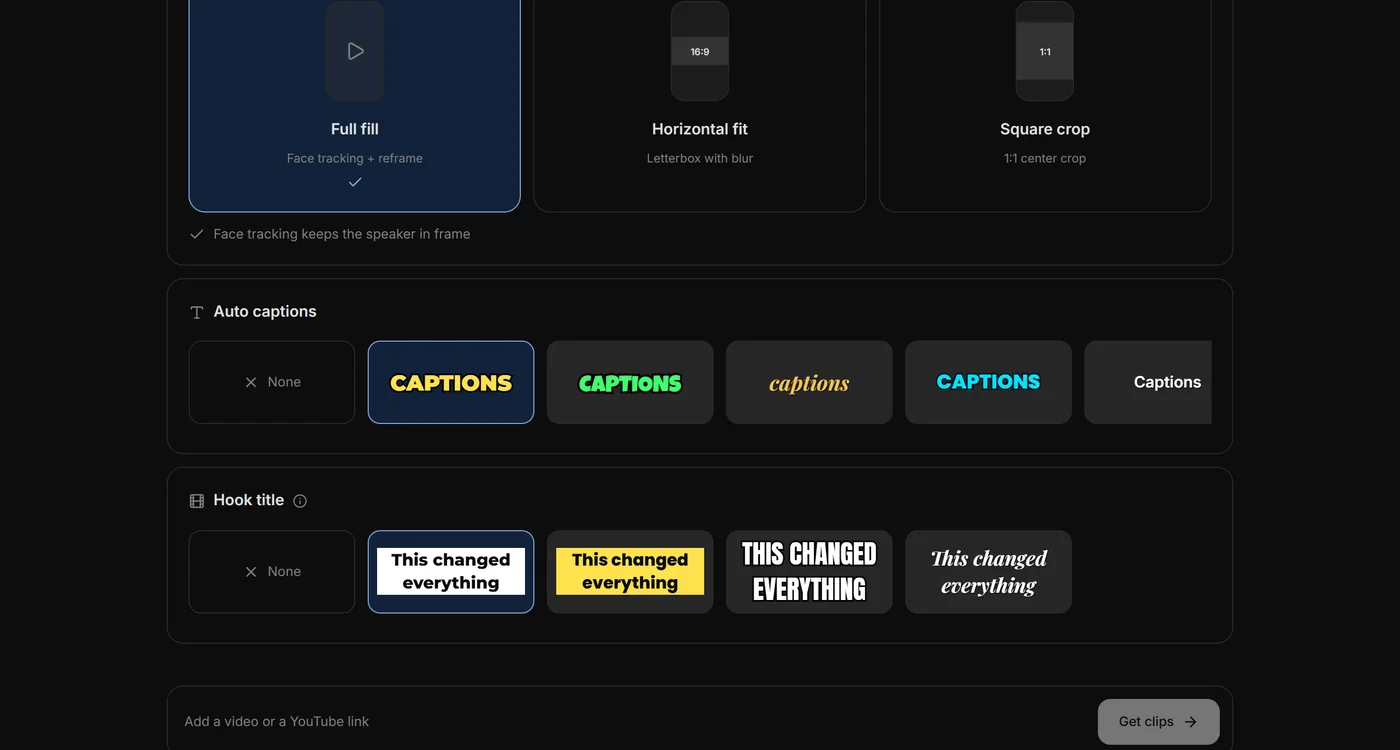
- Choose a layout, a caption style and a hook-title style. Face tracking keeps the speaker in frame.
- Click Get clips. AI finds the best moments and ranks them by virality score.
Check your clips
and export.
- Start with the clips that have the highest scores.
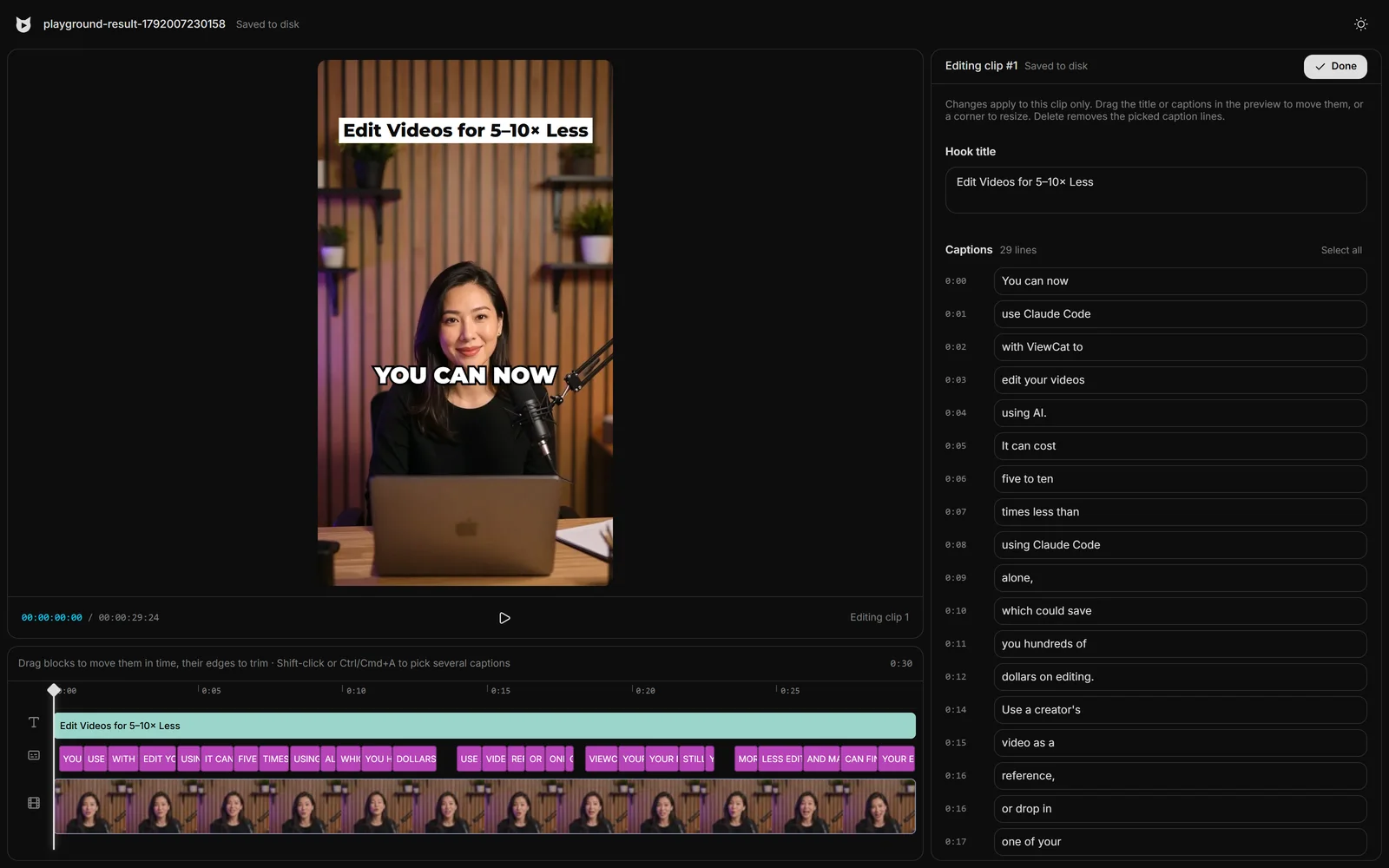
- Open any clip to fix a caption, retype the hook title or trim the start. The first second decides whether people keep watching.
- Export 1080×1920 MP4s with the captions and hook title burned in.
Post them
and get paid.
- Post your clips on YouTube Shorts and TikTok, with the tags your program asks for.
- Post a few clips every day instead of all of them at once. Steady posting keeps your accounts growing.
- Submit each clip's link to the program the way its rules say.
- Clipping programs pay anywhere from $200 to $800 per million views, depending on the program.
- Watch which hooks get the most views, then clip more moments like them.
Clipping questions,
straight answers.
What is clipping?
Clipping is cutting the best moments out of long videos, like podcasts, streams and interviews, into short vertical clips for TikTok, Reels and Shorts. Many creators and brands run clipping programs that pay clippers for the views their clips get.
Do I need editing experience?
No. Viewcat finds the moments, turns them vertical, keeps the speaker's face in frame and adds captions and a hook title. You can still change any caption or title before you export.
Why warm up a new account?
A brand-new account that posts straight away gives TikTok and YouTube nothing to go on. Spending a day or two watching, liking and commenting in your niche shows them who your account is for, so your first clips are shown to people who care about that niche.
How much does it cost?
Downloading Viewcat is free, and so is clipping with your own Claude Code, Codex or API key, up to five minutes of exported clips in total. A paid plan exports without limits and clips on Viewcat's own AI: Basic is $15 a month, with a 14-day money-back guarantee, less the value of credits you used.
Which videos can I clip?
Single public YouTube videos up to 6 hours, or a video file up to 20 GB. Only clip videos you own or have permission to use, such as a creator's clipping program.
Can I do this on my phone?
Not yet. Viewcat runs on Windows and Apple Silicon Macs. Sign up on your phone now and download it on your computer.
Will I make $10–30k a month?
Probably not at first, and many people never do. That figure is the founder's own monthly income from clipping, made with clips edited in Viewcat. What you earn depends on the programs you join, your niche and how often you post, and most beginners earn little or nothing in their first months.
Your first clips
are one link away.
Download Viewcat, warm up your accounts and post your first clips this week.
Free download · Clip free with your own agent · 14-day money-back guarantee